What is RAG in AI ? A Beginners-Friendly Guide
RAG stands for Retrieval-Augmented Generation. It is an AI technique that allows a Large Language Model (LLM) to retrieve relevant information from external sources and use that information to generate more accurate, context-aware answers.
In simple words, RAG allows an AI application to answer questions using your own data instead of relying only on the information it learned during training.
For example, imagine you have a website containing 500 technical blog articles. You want to build an AI chatbot that answers questions based on those articles.
Instead of manually training a new AI model, you can use RAG to retrieve relevant content from your articles and provide it to an existing AI model to generate an answer.
Let's understand how it works.
1. Real-World Example of RAG
Imagine you build an AI chatbot for a company.
The company has the following documents:
- Employee handbooks
- HR policies
- Leave policies
- Salary guidelines
- Frequently asked questions
An employee asks:
How many paid leaves can I take in a year?
A general AI model might not know the company's specific leave policy. It could even generate an incorrect answer.
With RAG, the application searches the company's documents, retrieves the relevant leave policy, and provides that information to the AI model.
The AI can then generate an answer based on the retrieved information.
Example answer:
According to the company's leave policy, employees are entitled to 24 paid leaves per year.
This is an illustrative example, not an actual company policy.
The important point is that the AI uses relevant company information to answer the question.
2. How Does RAG Work?
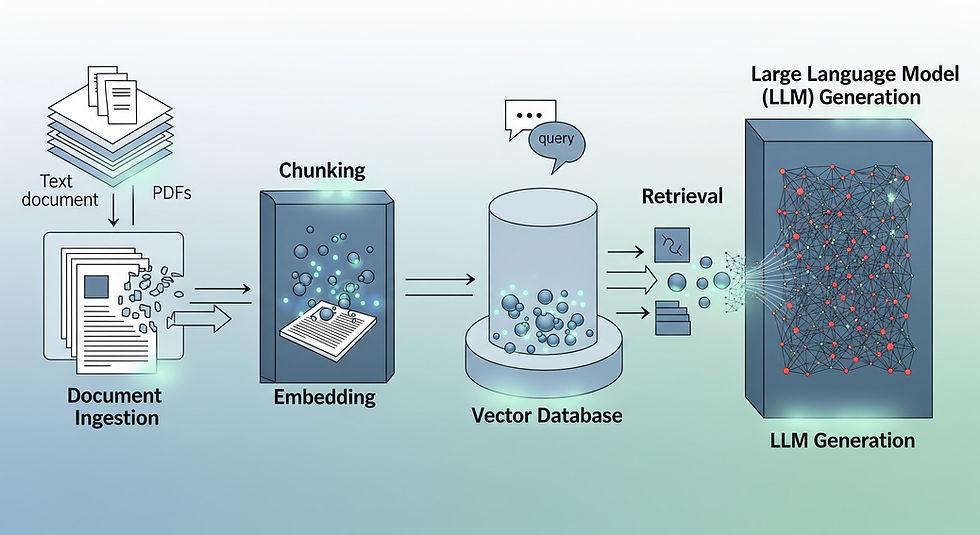
RAG typically involves three main stages:
Step 1: Data Ingestion
Step 2: Chunking & Embedding
Step 3: Retrieval & Generations

Step 1: Data Ingestion
First, collect the information you want your AI application to use.
Your data might include:
- PDF documents
- Word files
- Website content
- Database records
- Technical documentation
- Company knowledge bases
The application processes this information so it can be searched efficiently.
Step 2: Chunking and Embedding
Large documents are usually divided into smaller sections called chunks.
For example, a 100-page employee handbook might be split into hundreds of smaller text sections.
Next, an embedding model converts each text chunk into a numerical representation called an embeddings.
Embeddings help the system identify text with similar meanings.
For example:
- "How many holidays do employees get?"
- "What is the annual leave entitlement?"
Although these questions use different words, their meanings are similar.
An embedding-based retrieval system can help identify relevant sections of the leave policy.
The resulting embeddings are stored in a vector database or another system capable of performing vector search.
Step 3: Retrieval and Generation
When a user asks a question, the application generally performs these operations:
1. Receives the user's question.
2. Converts the question into an embedding when using vector-based retrieval.
3. Searches for relevant document chunks.
4. Retrieves the most useful information.
5. Adds the retrieved information to the prompt sent to the LLM.
6. Generates an answer using the question and retrieved context.
The final answer is returned to the user.
Important: RAG does not necessarily require a vector database. Depending on the application, retrieval can use keyword search, SQL queries, vector search, or a hybrid approach.